Plan loosely, decide weekly
What changed in Got Done version 1.13, why I made those changes, and how I hope they help with the plans that don't have a day yet.
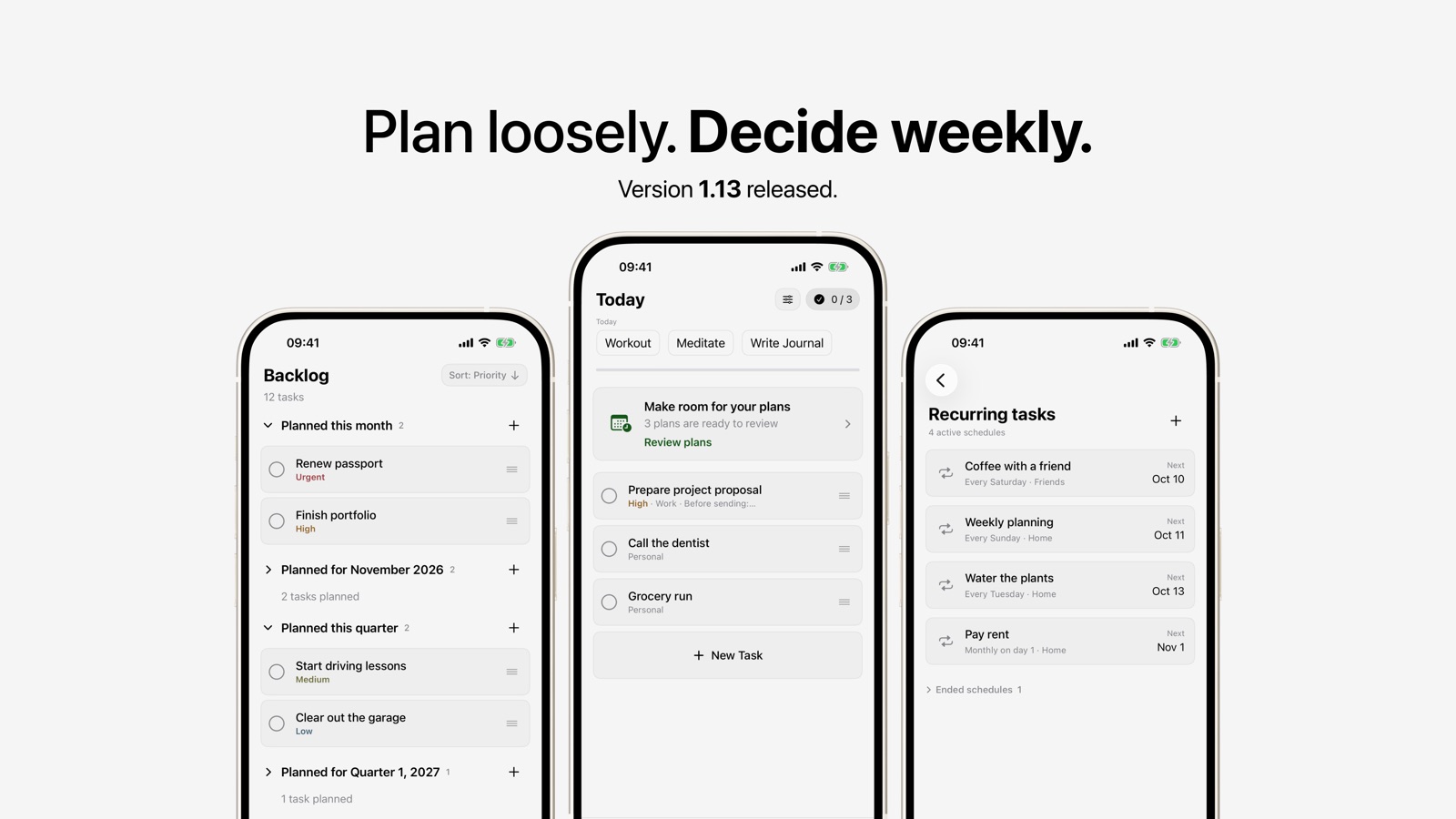
Version 1.13 is now available. Version 1.12 made the everyday parts of Got Done clearer. This update is about the things that don't fit into a single day yet: the passport you need to renew, the portfolio you want to finish, the driving lessons you keep meaning to start.
Most to-do apps give those tasks two options. You can pick a due date you'll probably miss, or you can leave them in an undated pile you never look at again. I wanted a middle ground that matches how people actually think about plans: "sometime this month", "this quarter", "next year". And I wanted a calm way to turn those plans into real days.
Plan for a month, a quarter or a year
You can now plan a task for a period instead of an exact date. The new Plan for sheet offers No date, Month, Quarter and Year, with arrows to move between periods.
A plan stays separate from an assigned day. "Sometime in October" is a real plan now, and you pick the exact day later, when you actually know it.
I hope this lets you write down what you intend without committing to a date you already know won't hold.
A Backlog that reads like a timeline
The Backlog is now grouped by period: planned this month, next month, this quarter, next quarter, this year, next year, and a section for ideas with no date yet. Within each section, tasks are sorted by priority, and every section can be collapsed.
You can drag a task from one section to another to re-plan it, or tap + on a section to add a task straight into it.
The old Backlog worked, but it was one long list. I hope the new one shows at a glance what's coming up soon and what can wait.
A weekly check-in that turns plans into days
Once a week, Got Done brings your plans back. When plans are due, a "Make room for your plans" card appears on Today. The review shows each plan with three choices: Assign day, Keep plan, or Plan later.
A plan comes up for review once its period has started and it has rested for at least a week. If a plan's period has already passed, the review tells you and asks what comes next.
The review runs on Sunday at 6 PM by default. In Settings you can change the day and time, or turn off the Today card. Reminders are off by default. If you turn them on, you get one notification at review time, and tapping it opens the review.
I added the review because plans only help if you look at them again. I hope one short check-in a week feels like a habit you can keep, not another thing to manage.
Recurring tasks get their own home
Recurring tasks used to have no overview. Now there's a Recurring tasks screen, which you can open from the top of Habits. It lists every active schedule with its rule, its category and the next date it shows up. Schedules that have ended move into a collapsed section so they stay out of the way.
You set up a recurring task once, and it keeps showing up when it should. I hope seeing all of them in one place makes it easier to trust that nothing repeating has been forgotten.
The small things
- Backups include your plans and review settings. Older backups still import.
- Everything is available in English, German and Simplified Chinese.
What I hope version 1.13 improves
- Bigger tasks have a place before they have a day.
- Your Backlog shows what's coming up instead of hiding it.
- Once a week, plans turn into real days.
- Recurring tasks are visible and easy to check.
Like 1.12, this isn't a new productivity method. Plan loosely, decide weekly, and let Got Done hold the rest.
Update or download Got Done
Version 1.13 is available now. Download or update Got Done on the App Store.
If you try the update, I'd like to hear what works and what still gets in your way. Email me with your feedback. You'll reach me directly.